

What Is Disaster Recovery in Cloud Computing?
A comprehensive guide to business continuity in the cloud.
Data loss can be catastrophic. Imagine crucial business information vanishing in an instant, taking your operations down with it. That is where disaster recovery steps in.
Cloud computing has changed how businesses operate, but it also introduces new vulnerabilities. Preparing for the unexpected is now more critical than ever.
This guide will explore the ins and outs of disaster recovery in cloud computing, empowering you to protect your business and ensure continuity.
Cloud computing is now the foundation of many businesses. The cloud stores important data and runs key applications. It offers scalability, accessibility, and cost-efficiency. However, with this comes a crucial need: disaster recovery (DR). DR in cloud computing is a strategic requirement. It makes sure your business can handle unexpected events. It also helps maintain operations and minimize downtime. This guide explains cloud-based DR, its importance, the strategies involved, and how to use them. A strong DR plan is essential for any organization that uses cloud services.
Quick navigation
Understanding Disaster Recovery
Disaster recovery is a set of policies and procedures. These allow the recovery or continuation of important technology infrastructure and systems after a disaster. This can be a power outage, a cyberattack, or a natural disaster. In cloud computing, DR deals with data, applications, and infrastructure hosted in the cloud. It is a proactive approach to prevent or reduce the impact of disruptive events. This means having a clear plan to address possible threats and reduce downtime.
What is a disaster? It is any event that disrupts normal business operations and prevents access to data and systems. This could be hardware failure, software corruption, human error, or a malicious attack. The goal of DR is to restore operations as quickly as possible. This ensures minimal disruption to business processes.
Why Is Disaster Recovery Crucial in the Cloud?
Cloud computing offers many benefits. It also presents new challenges. Cloud environments are often more complex and spread out than traditional infrastructure. A disaster can have a larger impact. The shared nature of cloud resources also introduces risks. If one component fails, it can affect multiple users.
Consider the impact of downtime. Even a short interruption can lead to financial losses, damage to reputation, and loss of customer trust. Implementing DR in the cloud helps mitigate these risks. It provides a safety net in case of an unforeseen event. It ensures business continuity. It allows you to quickly recover data and resume operations. The need for DR increases when many businesses rely on the cloud.
Key Concepts: RTO and RPO
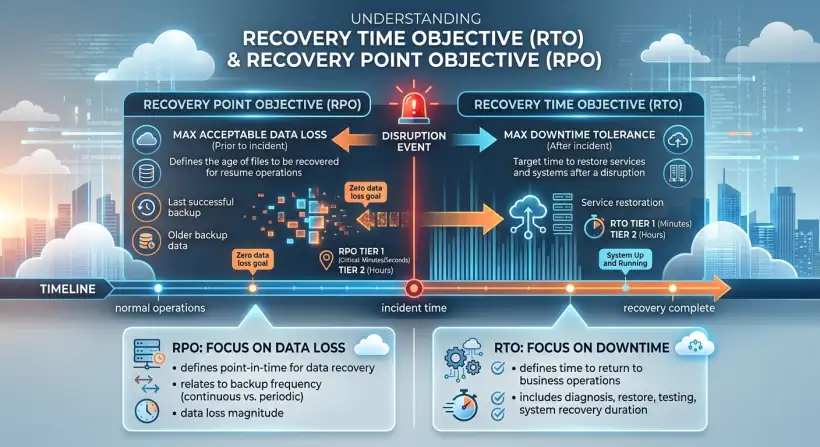
Two metrics define a disaster recovery plan's effectiveness: Recovery Time Objective (RTO) and Recovery Point Objective (RPO). These metrics are the foundation for any DR strategy. They help define the plan's goals and determine the needed resources.
RTO is the maximum acceptable downtime after a disaster. It is the time within which systems and applications must be restored. A lower RTO means a faster recovery time and a more resilient DR plan.
RPO is the maximum acceptable data loss measured in time. It defines the point in time to which data must be recovered after a disaster. For example, an RPO of one hour means you can lose up to one hour of data. A shorter RPO requires frequent data backups and more recovery methods.
Understanding RTO and RPO is critical when designing a DR plan. They dictate the technologies and strategies to use. Choosing the correct RTO and RPO values should be based on a thorough business impact analysis. Consider the importance of various applications and data sets.
Disaster Recovery Planning: A Step-by-Step Approach
Creating a strong DR plan involves several steps. Assess the risks your business faces. Identify potential threats, vulnerabilities, and the impact of a disruption. Then, conduct a business impact analysis (BIA). The BIA helps you determine the impact of a disaster on business operations. It also helps with the critical systems and acceptable downtime for each system. This will help define the RTO and RPO for each system and application.
With this information, you can develop a recovery strategy. This involves selecting DR solutions, such as data replication, failover mechanisms, and backup and restore processes. The strategy should also include procedures for recovery, testing, and maintenance. Your plan should cover how to communicate with stakeholders during a disaster.
Regular testing of the DR plan is essential to ensure it works. Simulate disaster scenarios and verify that the recovery procedures work. Review and update the DR plan regularly. This will reflect changes in the business and IT environment. A well-documented and regularly tested DR plan is your best defense against unexpected disruptions.
Cloud-Based Disaster Recovery Strategies
Cloud providers offer various DR strategies. Each has advantages and disadvantages. These strategies range from basic backup and restore to more advanced approaches like active-active configurations. The strategy choice depends on the business's RTO and RPO requirements, budget, and the IT environment's complexity.
Backup and Restore: This is the most basic DR strategy. It involves backing up data and applications to a separate location. You restore them in case of a disaster. It is cost-effective but has a longer RTO.
Pilot Light: A pilot light strategy keeps a minimal version of the infrastructure running in the cloud. It is ready to scale up when needed. This approach offers a faster RTO than backup and restore while still being cost-effective.
Warm Standby: In a warm standby approach, a scaled-down version of the production environment runs in the cloud. It is always ready. This approach offers a faster RTO than pilot light.
Multi-site or Active-Active: This is the most advanced and expensive DR strategy. It involves running the application in two or more active environments simultaneously, with traffic balanced across them. This offers the fastest RTO and RPO.
Each strategy has pros and cons. The best choice depends on your needs. Understanding the different options is key to building a resilient cloud infrastructure.
What this means for you
Implementing a comprehensive disaster recovery plan is crucial. It protects your business's data and operations in the cloud. You will have peace of mind knowing you can recover from disruptive events. You will minimize downtime, reduce potential financial losses, and maintain customer trust. Plan for potential disasters. This ensures your business remains resilient and adaptable. This is not just about technology. It is about business continuity and protecting your investment.
Proper disaster recovery planning can improve compliance with industry regulations and standards. Many industries, such as finance (FinTech), healthcare, and government, have strict requirements for data protection and business continuity. A well-designed DR plan can help you meet these requirements. A strong DR strategy can provide a competitive advantage. It shows a commitment to data security and business resilience. This can enhance your reputation and build trust with customers, partners, and stakeholders. DR planning can streamline IT operations. This is done by identifying inefficiencies and optimizing processes. This leads to a more agile and responsive IT infrastructure.
Risks, trade-offs, and blind spots
Disaster recovery in the cloud offers significant benefits. Understand the associated risks, trade-offs, and potential blind spots. One risk is the complexity of cloud environments. Managing and maintaining a DR plan across multiple cloud services and regions can be challenging.
Another trade-off is the cost. Implementing and maintaining a strong DR plan can be expensive. This is especially true for more advanced strategies. Blind spots can arise if the DR plan does not accurately reflect the current IT environment. Insufficient testing is a major risk. It can lead to unexpected issues during a real disaster. A DR plan's effectiveness relies on factors outside your control, such as the cloud provider's infrastructure and services.
To reduce these risks, assess your business needs. Choose appropriate DR strategies. Regularly test and update your plan. Consider the impact of vendor lock-in. Ensure your DR plan adapts to changing business requirements and technology. Ensure strong security measures are in place to protect against cyber threats.
Main points
- Definition: Disaster recovery is a set of policies and procedures that enable the recovery or continuation of vital technology infrastructure and systems following a disaster.
- Importance: DR ensures business continuity, minimizes downtime, and protects data.
- Key Metrics: RTO (Recovery Time Objective) and RPO (Recovery Point Objective) are crucial for defining DR goals.
- Planning Steps: Assess risks, conduct a business impact analysis (BIA), develop a recovery strategy, test regularly, and update the plan.
- Cloud Strategies: Backup and restore, pilot light, warm standby, and multi-site/active-active are common approaches.
- Benefits: Reduced downtime, improved compliance, enhanced reputation, and streamlined IT operations.
- Risks: Complexity, cost, and reliance on cloud providers are potential challenges.
- Continuous Improvement: Regularly test and update your DR plan to adapt to changing business and IT environments.
Disaster recovery in cloud computing is essential for any business relying on cloud services. Understand the key concepts, plan effectively, and choose the right strategies. You can protect your data and operations. Take the time to assess your needs. Develop a comprehensive DR plan. Regularly test its effectiveness. This will help you ensure business continuity, minimize downtime, and build a resilient infrastructure.