

Cloud Hosting for QuickBooks Desktop: Your Definitive Comparison Guide
Unlock accessibility and efficiency: a deep dive into top providers, features, and pricing to find your ideal solution.
Are you still tethered to your office desktop, limiting your QuickBooks access and team collaboration?
The promise of anytime, anywhere access for your critical financial software is compelling, but where do you even start?
Choosing the right cloud hosting for QuickBooks Desktop doesn't have to be a guessing game. It's about finding the perfect blend of performance, security, and support.
Moving your QuickBooks Desktop software to the cloud is a strategic decision that can revolutionize how your business manages its finances. It offers unprecedented flexibility, allowing you and your team to access your QuickBooks files from any device, anywhere in the world, as long as you have an internet connection. This enhanced accessibility directly translates into improved collaboration, greater operational efficiency, and a significant boost in business agility. However, with a multitude of providers offering various features and pricing structures, selecting the ideal cloud hosting for QuickBooks Desktop can be a complex undertaking.
This comprehensive guide will compare various cloud hosting providers, dissecting their core features, pricing models, performance benchmarks, and critical security protocols. Our goal is to equip you with the insights needed to make an informed choice, ensuring you select the best hosting solution that aligns perfectly with your specific business needs, budget, and future growth aspirations.
Quick navigation
Understanding Cloud Hosting for QuickBooks Desktop: The Fundamentals
Before diving into comparisons, it's vital to clearly define what cloud hosting for QuickBooks Desktop actually means. Simply put, it involves installing your QuickBooks Desktop software on a remote, secure server that is maintained by a third-party provider. Instead of running QuickBooks on your local computer, you access it over the internet, typically through a remote desktop application or web browser. This setup transforms your traditional desktop software into a powerful, accessible cloud solution. But why is this shift becoming so popular among businesses?
The primary appeal lies in eliminating geographical constraints and IT overhead. Your team can work from home, the office, or anywhere else with an internet connection, collaborating on the same QuickBooks company file in real-time. This real-time collaboration is a game-changer for many businesses, fostering greater efficiency and accuracy in financial operations. Furthermore, the hosting provider handles all the technical aspects: server maintenance, software updates, data backups, and ensuring robust security measures are in place. This frees up your internal IT resources, allowing you to focus on core business activities rather than managing servers.
Think of it this way: You're effectively leasing a high-performance virtual computer specifically configured for QuickBooks. This virtual environment ensures optimal performance, even for large company files and multiple users, which can often be a challenge with local installations. It's about leveraging professional infrastructure without the capital expense.
Moreover, cloud hosting inherently improves data security and disaster recovery capabilities. Reputable providers invest heavily in enterprise-grade firewalls, intrusion detection systems, and daily backups stored in geographically dispersed data centers. Should a local hardware failure, natural disaster, or cyberattack occur, your financial data remains safe and accessible. Is the investment worth the peace of mind and operational agility it brings? For a more general overview of what QuickBooks hosting entails, you can refer to this comprehensive guide to QuickBooks hosting.
Essential Features to Look for in QuickBooks Cloud Hosting
When evaluating providers for cloud hosting for QuickBooks Desktop, simply having your software online isn't enough. The true value lies in the features and services that enhance performance, security, and usability. What are the non-negotiable elements that every discerning business should seek out?
Performance and Reliability
High availability and consistent performance are paramount. Look for providers that offer a strong Service Level Agreement (SLA) with guaranteed uptime, ideally 99.9% or higher. Inquire about their server specifications, including CPU, RAM, and storage type (SSDs are preferable for speed). Do they utilize load balancing to distribute traffic and prevent slowdowns during peak usage? Faster processing for reports and transactions directly impacts your team's productivity.
Key Performance Indicators:
- Guaranteed Uptime: A reliable host will offer an SLA promising minimal downtime.
- Scalability: Can they easily scale resources (CPU, RAM, storage) up or down as your business needs change?
- Data Center Quality: Are their data centers TIER III or TIER IV certified, indicating robust infrastructure and redundancy?
- Latency: Low latency ensures a smooth, responsive user experience, even from remote locations.
Security and Data Protection
Your financial data is sensitive; its protection is non-negotiable. A reputable cloud host should offer multi-layered security. This includes physical security at data centers, advanced firewalls, intrusion detection/prevention systems (IDS/IPS), and robust encryption protocols for data in transit and at rest. Multi-factor authentication (MFA) for user access is a must. Additionally, comprehensive backup and disaster recovery plans are critical. How frequently are backups are performed, and for how long are they retained? Can they quickly restore your data in case of an incident?
Customer Support and Expertise
Even with the most stable system, questions and issues will arise. The quality and availability of customer support are often overlooked but can be a deal-breaker. Look for 24/7/365 support via multiple channels (phone, email, chat) with QuickBooks-specific expertise. Can they assist with QuickBooks-related issues, or are they limited to basic server problems? A knowledgeable support team can save you significant time and frustration.
Integrations and Add-ons
Many businesses rely on third-party applications that integrate with QuickBooks Desktop (e.g., CRM, inventory management, payroll). Ensure the hosting provider supports and can seamlessly integrate your specific add-ons. Some providers specialize in particular industries or offer pre-configured environments for common integrations. Does their platform easily accommodate your existing tech stack?

Top Cloud Hosting Providers for QuickBooks Desktop: A Detailed Comparison
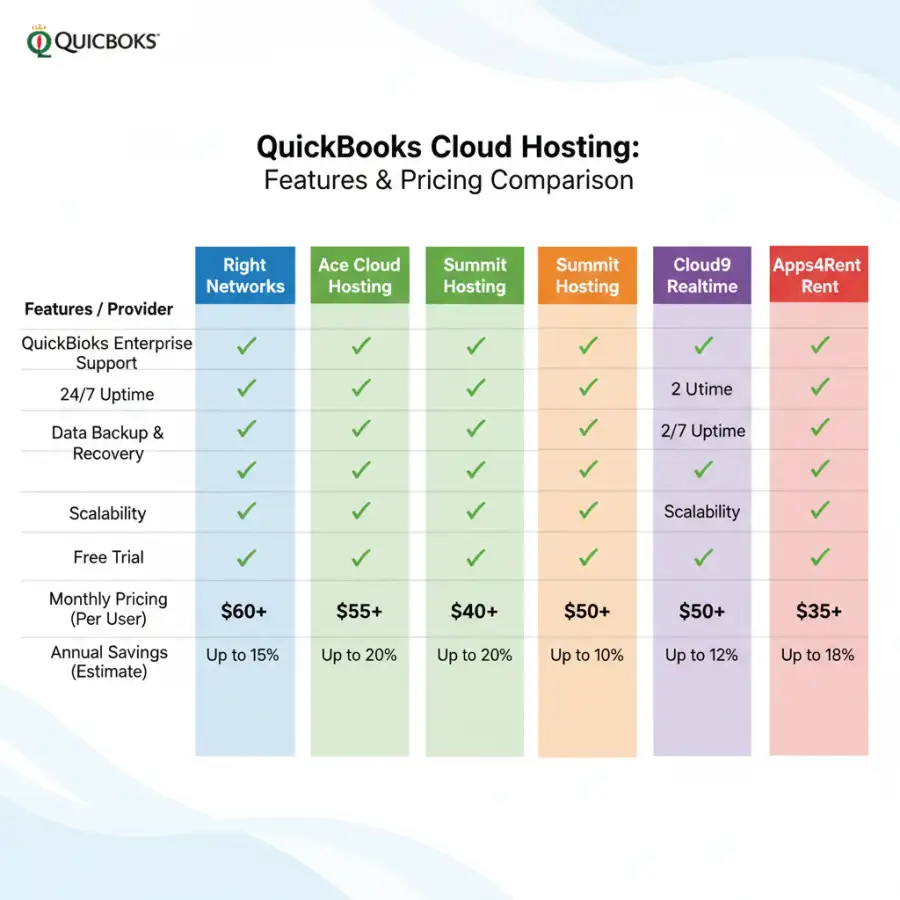
The market for cloud hosting for QuickBooks Desktop is competitive, with many providers offering tailored solutions. While specific pricing and features constantly evolve, we can examine some of the leading players and what generally distinguishes them. How do these providers stack up against each other when it comes to delivering on their promises?
| Provider Characteristic | Common Offering/Focus | Ideal For | Consideration Points |
|---|---|---|---|
| Managed Cloud Hosts | Full-service management, 24/7 QB-specific support, high uptime, advanced security. | Businesses prioritizing hands-off IT, robust performance, and expert support. | Often higher cost, but includes extensive services. |
| Performance-Optimized Hosts | Dedicated resources, SSD storage, high-speed networks, designed for demanding workloads. | Large QuickBooks files, multiple simultaneous users, complex add-ons. | Higher pricing, but minimal lag and maximum efficiency. |
| Budget-Friendly Options | More affordable plans, shared server environments, basic features. | Small businesses, single users, limited add-ons, cost-conscious. | May have less dedicated support, potential for performance variability. |
| Niche & Industry-Specific Hosts | Tailored environments for specific industries (e.g., construction, manufacturing), specialized add-on support. | Businesses with unique software integration or compliance needs. | Ensures compatibility but might be less flexible for general use. |
It's worth noting that many providers offer tiered plans (e.g., basic, standard, premium) that scale with the number of users, storage needs, and required features. Always initiate a direct conversation with a sales representative to get a custom quote based on your exact requirements. A free trial, if available, can also provide invaluable insight into a provider's service quality.
What are the general considerations for any cloud hosting?
When comparing cloud hosting solutions for any software, not just QuickBooks, several universal factors come into play. These include the geographic location of data centers (for compliance and latency), the provider's overall reputation and longevity in the market, and their transparency regarding security audits and certifications. It's also wise to read independent reviews and seek feedback from other businesses using their services. For a broader understanding of hosting financial software in the cloud, you can find valuable insights in this definitive guide to hosting Sage in the cloud.
Beyond QuickBooks, what other cloud hosting options exist for accounting?
While QuickBooks Desktop dominates much of the small to medium business accounting landscape, other robust accounting software packages also benefit immensely from cloud hosting. Programs like Sage 50 or Xero often have dedicated cloud hosting solutions tailored to their specific needs. Understanding these alternatives can help you benchmark features and services. Explore this comprehensive article on Sage cloud hosting for a comparative perspective on cloud solutions for other popular accounting platforms.
What this means for you
The decision to move your QuickBooks Desktop to a hosted cloud environment is a significant one, directly impacting your daily operations and financial management. What's the best path forward given the array of options?
If you're a small business owner, perhaps a freelancer or a startup with minimal users, a cost-effective, entry-level hosting solution might be a perfect fit. It provides the essential remote access and collaboration benefits without overburdening your budget. The key here is to confirm that even these basic plans include reliable backups and sufficient security for your data.
Focus on Scalability and Support: Regardless of your current size, consider providers who can seamlessly accommodate growth. Can you easily add more users or increase storage as your business expands? Furthermore, prioritize responsive and knowledgeable customer support. When critical financial data is involved, quick resolution of issues is invaluable.
For growing businesses, medium-sized enterprises, or those in highly regulated industries, the investment in a mid-tier or premium provider will often pay dividends. These solutions typically offer dedicated resources, advanced security certifications (like SOC 2, HIPAA), and specialized support for complex QuickBooks setups and integrated add-ons. The slightly higher cost translates into greater stability, stronger data protection, and peace of mind.
Ultimately, the "best" cloud hosting for QuickBooks Desktop isn't about finding the cheapest plan, but the one that delivers the optimal balance of features, performance, security, and support for your specific operational demands. It's an investment in a more agile, resilient, and productive financial future for your business.
Risks, trade-offs, and blind spots
While the benefits of cloud hosting for QuickBooks Desktop are clear, ignoring potential risks and trade-offs would be a disservice. What are the common pitfalls and hidden complexities that businesses often overlook?
Vendor Lock-in and Migration Headaches: Switching hosting providers can be complex and time-consuming. Ensure you understand the provider's data export policies, potential migration fees, and the overall process for moving your QuickBooks company files should you decide to change hosts in the future. Evaluate their flexibility before committing.
One trade-off is the relinquishment of direct control over your server environment. While expert management is a significant advantage, it means you're reliant on the provider's schedule for maintenance, updates, and troubleshooting. A clear Service Level Agreement (SLA) with defined response times and issue resolution guarantees is crucial here. Can you accept their turnaround times for critical issues?
Another blind spot can be underestimating your actual resource needs. Opting for a bare-bones plan to save money might lead to slow performance, especially with multiple users or large company files. This bottleneck can severely impact productivity and lead to frustration. Always err on the side of slightly over-provisioning resources, especially for CPU and RAM, to ensure a smooth user experience.
Finally, always scrutinize the security provisions beyond marketing claims. Ask for details on their data center certifications, encryption standards, and employee background checks. A single security breach could have devastating consequences for your business. Do their security measures truly meet your industry's compliance requirements?
Main points
Selecting the right cloud hosting for QuickBooks Desktop is a pivotal decision for modern businesses seeking efficiency and flexibility. Here are the core takeaways to guide your choice:
- Embrace Accessibility and Collaboration: Cloud hosting liberates QuickBooks Desktop from your local machine, enabling remote access and real-time multi-user collaboration from anywhere.
- Prioritize Performance and Uptime: Look for strong SLAs, ample server resources (CPU, RAM, SSD), and robust infrastructure to ensure smooth, lag-free operations, even with large files.
- Security is Non-Negotiable: Verify advanced security measures, including multi-factor authentication, enterprise-grade firewalls, data encryption, and comprehensive backup/disaster recovery plans.
- Evaluate Support Quality and Expertise: Opt for providers offering 24/7/365 support with QuickBooks-specific knowledge to quickly resolve any technical or application-related issues.
- Consider Integrations and Scalability: Ensure the host supports your essential third-party add-ons and offers flexible scaling options to accommodate future business growth.
- Beware of Hidden Costs: Scrutinize pricing structures for any additional fees for backups, migrations, or advanced features. Always request a detailed, all-inclusive quote.
- Choose Value Over Lowest Price: The ideal hosting solution provides the best balance of features, performance, and support for your budget, offering true long-term value.
Empower your business with the right cloud hosting solution for QuickBooks Desktop. Take the time to compare thoroughly, prioritize your unique needs, and invest in a platform that truly supports your operational excellence.