

QuickBooks Hosting Price: A Deep Comparison for Informed Decisions
Unraveling the costs, features, and true value of cloud hosting for your QuickBooks Desktop software.
Are you tired of the limitations of desktop QuickBooks, yet hesitant about the jump to the cloud?
The myriad of hosting providers, each with their own pricing structure, can feel like a complex puzzle.
It's time to cut through the noise and discover the real investment required for a seamless cloud accounting experience.
Migrating your QuickBooks Desktop software to the cloud offers unparalleled flexibility, accessibility, and collaboration. However, understanding the true QuickBooks hosting price involves much more than just the monthly fee. It's about a comprehensive evaluation of provider features, performance, security protocols, and the quality of support you'll receive. Making an informed decision means diving deep into what each hosting solution truly offers for your specific business needs and budget.
This article will guide you through the intricacies of QuickBooks Desktop cloud hosting providers. We’ll dissect their pricing models, examine essential features, scrutinize performance and security standards, and assess their support options. By the end, you'll be equipped with the knowledge to confidently choose the best hosting solution, ensuring your financial operations run smoothly in the cloud.
Quick navigation
Understanding QuickBooks Hosting: The Basics
Before comparing costs, it's crucial to grasp what QuickBooks hosting entails. Essentially, it means installing your QuickBooks Desktop software on a remote server, accessible via the internet from any device, anywhere. This move transforms a local application into a powerful cloud-based tool, allowing multiple users to access and work on the same company file simultaneously without being in the same office. But what makes this transition so appealing for businesses of all sizes?
The core benefit lies in flexibility and efficiency. Imagine your accounting team, scattered across different locations, all working on the same ledger in real-time. Or perhaps you're a business owner needing to check financial reports from a client site or while traveling. Cloud hosting makes this a reality, eliminating the need for complex IT infrastructure within your own office. It also offloads the burden of server maintenance, backups, and security updates to your chosen hosting provider.
Beyond convenience, there are significant operational advantages. Data security is often enhanced, with providers typically offering advanced encryption, redundant servers, and disaster recovery plans that would be costly for small to medium-sized businesses to implement on their own. Performance also sees a boost, as dedicated servers are optimized for QuickBooks, leading to faster processing speeds for tasks like report generation and transaction entry. For a deeper breakdown of the fundamentals, see this in-depth guide on comprehensive QuickBooks hosting.
Consider the typical setup: your provider hosts a virtual desktop environment, complete with QuickBooks Desktop and any necessary add-ons. You simply log in via a secure portal or remote desktop application, and it feels just like working on a local machine, only with the added power and accessibility of the cloud. This setup is particularly beneficial for businesses that rely heavily on the advanced features of QuickBooks Desktop, which aren't always available in QuickBooks Online versions. So, how does this translate into pricing?
Key Factors Influencing QuickBooks Hosting Prices
The cost of QuickBooks hosting isn't a one-size-fits-all figure. Several variables play a significant role in determining your monthly or annual investment. Understanding these factors is paramount to accurately comparing providers and avoiding unexpected expenses. What exactly are you paying for when you opt for cloud-based QuickBooks?
Primary Cost Drivers:
- Number of Users: This is often the most impactful factor. Most providers charge per user per month. The more users who need simultaneous access, the higher the cost.
- Storage Requirements: While standard plans include a certain amount of storage (e.g., 50GB, 100GB), businesses with very large company files or extensive document storage needs may incur additional charges for extra space.
- QuickBooks Version and Add-ons: Hosting prices can vary based on the specific QuickBooks Desktop edition (Pro, Premier, Enterprise) and whether you require hosting for integrated third-party applications (e.g., CRM, inventory management tools).
- Dedicated vs. Shared Servers: Shared hosting is generally more affordable, with your QuickBooks instance residing on a server alongside other clients. Dedicated servers, offering enhanced performance and security isolation, come at a premium price.
- Service Level Agreements (SLAs) & Uptime Guarantees: Higher guaranteed uptime (e.g., 99.999%) and more robust SLAs often reflect in higher pricing, indicating a more reliable and resilient infrastructure.
Performance and Resource Allocation
Beyond the basics, the underlying server resources allocated to your instance will influence performance and, consequently, price. Providers might offer different tiers based on CPU, RAM, and bandwidth. A small business with minimal transactions might be fine with a basic package, but a growing enterprise with complex operations and many users will need more robust resources to avoid lag and ensure efficiency.
Security Features
While all reputable hosts offer baseline security, advanced features like multi-factor authentication (MFA), intrusion detection systems (IDS), daily backups with longer retention periods, and specific compliance certifications (e.g., HIPAA, SOC 2) can influence pricing. These features are crucial for protecting sensitive financial data and should be weighed against their cost.
Support & Maintenance
The level of customer support is another key differentiator. Some providers offer 24/7 phone, email, and chat support as standard, while others might tier their support options, with premium support packages adding to the overall cost. Fully managed services, where the provider handles all QuickBooks updates and maintenance, also command a higher price point but offer greater peace of mind. Does a lower monthly fee truly save you money if you spend hours troubleshooting issues yourself?

Top QuickBooks Hosting Providers: A Price Comparison
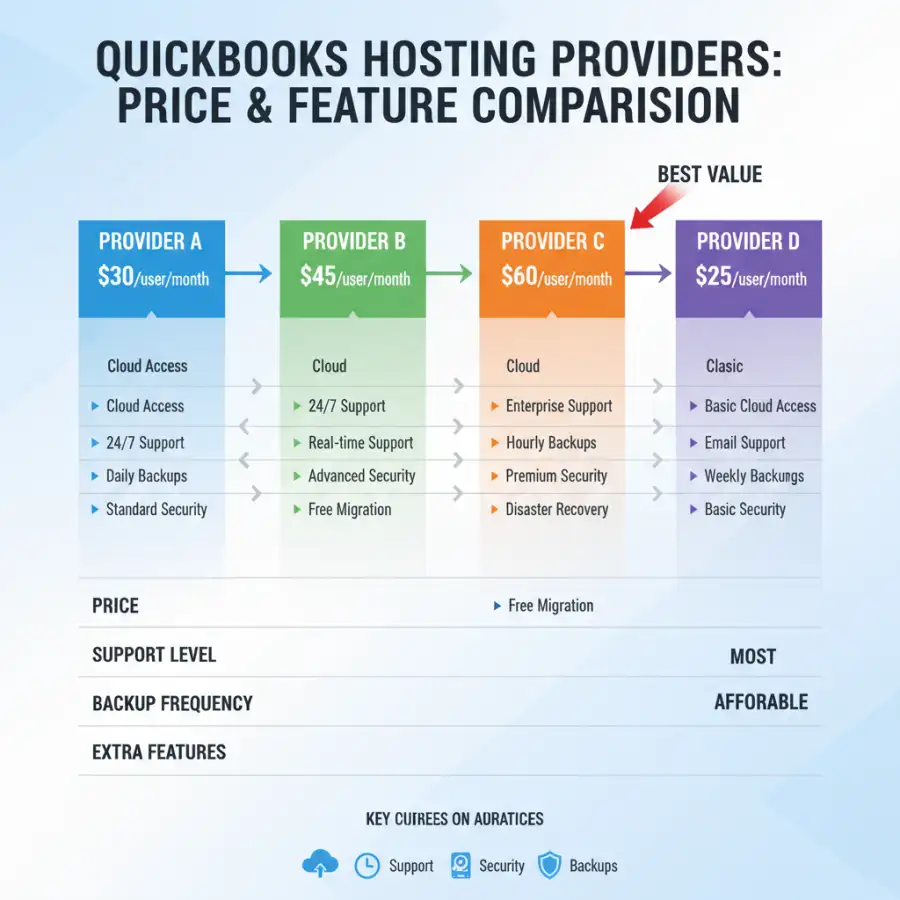
With numerous providers vying for your business, comparing their offerings can feel like navigating a maze. While exact pricing is dynamic and often requires a custom quote, we can outline typical price ranges and key differentiators among leading QuickBooks hosting services. What's the real cost of moving your QuickBooks to the cloud, beyond the advertised headlines?
| Provider Type | Typical Monthly Price Range (per user) | Key Features | Best Suited For |
|---|---|---|---|
| Entry-Level Hosts | $20 - $40 | Basic hosting, standard security, limited support hours, often shared servers, sometimes restricted add-on integration. | Small businesses, single users, minimal add-ons, budget-conscious. |
| Mid-Tier Specialists | $40 - $70 | Enhanced security, 24/7 support, managed updates, better performance, good add-on compatibility, often semi-dedicated environments. | Growing SMEs, multiple users, moderate add-on use, those valuing reliability. |
| Premium & Enterprise Hosts | $70 - $120+ | Dedicated servers, advanced security & compliance (HIPAA, SOC 2), top-tier performance, white-glove 24/7 support, custom configurations, extensive add-on support. | Large enterprises, highly regulated industries, complex needs, mission-critical operations. |
It's important to remember that these are general ranges. Many providers offer discounts for annual billing or for a higher number of users. Always request a detailed quote tailored to your specific user count, QuickBooks version, and any required third-party integrations.
How do I compare cloud hosting solutions effectively?
Comparing cloud hosting solutions requires a holistic approach, looking beyond just the sticker price. Evaluate not only the monthly cost but also the value proposition. This includes scrutinizing the reliability (uptime guarantees), scalability options (how easy is it to add or remove users/resources?), and the provider's track record for customer service. A provider with a higher price might offer superior performance, robust security, and proactive support that ultimately saves you money and headaches in the long run. For more insights on comprehensive cloud hosting solutions, including those for other popular accounting software, read your definitive guide to hosting Sage in the cloud.
What specific questions should I ask potential hosts?
When engaging with potential QuickBooks hosting providers, arm yourself with a list of targeted questions. Ask about their data center locations, backup frequency and retention, disaster recovery plans, and specific security certifications. Inquire about their process for QuickBooks updates and how they handle add-on installations. Understand their support channels, response times, and whether there are any hidden fees for certain types of assistance. Knowing these details upfront can prevent significant issues later. For an even broader perspective on cloud hosting for financial software, explore this comprehensive article on Sage cloud hosting.
What this means for you
Navigating the various QuickBooks hosting options and their associated costs can feel overwhelming, but understanding the nuances directly impacts your business's operational efficiency and bottom line. What's the most critical takeaway for your specific situation?
For a small business with just one or two users and basic QuickBooks needs, an entry-level hosting plan might suffice. These plans offer the essential cloud access at a lower price point, allowing you to benefit from remote access and basic collaboration without a significant financial commitment. The trade-off might be less extensive support or shared server resources, which might not be an issue for lighter usage.
Consider Your Growth Path: As your business expands, so too might your need for more users, more storage, and more integrated applications. Choosing a provider that offers clear upgrade paths and flexible scaling options is crucial. A hosting solution that seems cheap now might become prohibitively expensive or severely limiting as your business evolves.
Medium-sized businesses or those with specific industry requirements (like construction, manufacturing, or non-profits using specialized QuickBooks Premier versions) will likely find more value in mid-tier or even premium providers. These solutions typically offer better performance, more robust security, and dedicated support for add-ons that are critical to specialized workflows. The slightly higher cost is often justified by increased productivity, reduced downtime, and greater data integrity.
Ultimately, the "best" QuickBooks hosting price isn't the lowest price; it's the price that delivers the right balance of features, performance, security, and support for your unique operational demands. It's an investment in your financial infrastructure, designed to streamline accounting processes and empower your team.
Risks, trade-offs, and blind spots
While QuickBooks hosting offers numerous advantages, it’s not without potential downsides, hidden costs, and areas where businesses often overlook critical details. What are the common pitfalls you should actively try to avoid?
Beware of Hidden Fees: Some providers might advertise a low base price but then charge extra for essential features like daily backups, data migration assistance, advanced security features, or even specific QuickBooks versions. Always get a detailed breakdown of all potential costs before committing.
A significant trade-off can be the loss of direct control over your IT environment. While handing over server maintenance to experts is a benefit, it also means you're reliant on your provider's policies for updates, software installations, and troubleshooting. Ensure their communication protocols are clear and their responsiveness meets your expectations.
Another blind spot can be vendor lock-in. While migrating data is generally possible, moving from one hosting provider to another can sometimes be a complex process. Understand their data export policies and any associated fees. Does their contract make it easy or difficult to switch if you become dissatisfied?
Finally, consider the long-term cost. A low monthly fee might seem attractive initially, but if it comes with frequent downtime, slow performance, or inadequate support, the cumulative cost in lost productivity and frustration can far outweigh any upfront savings. It's essential to look at the total cost of ownership, not just the base subscription fee. Is the cheapest option truly the most cost-effective solution in the long run?
Main points
Choosing the right QuickBooks hosting provider requires careful consideration beyond just the monthly price tag. Here are the key takeaways to guide your decision-making process:
- Beyond the Base Price: QuickBooks hosting price includes more than just the subscription fee. Account for user count, storage, QuickBooks version, add-ons, and service level.
- Evaluate Value, Not Just Cost: The cheapest option isn't always the best. Prioritize providers that offer a strong balance of features, performance, security, and reliable support for your specific business needs.
- Understand Core Factors: User count, server type (shared vs. dedicated), security features, and the level of customer support are major determinants of hosting costs.
- Compare Provider Tiers: Hosting providers generally fall into entry-level, mid-tier, and premium categories, each offering different price points and feature sets to match varying business demands.
- Scrutinize SLAs and Uptime: Ensure the provider's service level agreements guarantee the uptime and reliability critical for your financial operations.
- Anticipate Hidden Costs: Always ask for a comprehensive quote that details all potential charges for backups, add-ons, migrations, and support tiers to avoid surprises.
- Plan for Scalability: Choose a hosting solution that can easily scale up or down with your business's growth, accommodating more users or resources without major disruptions.
By thoroughly evaluating these aspects, you can make an informed decision that secures a robust, efficient, and cost-effective QuickBooks hosting solution for your business. Don't rush; invest time in researching to find the perfect cloud partner for your financial management.