
Streamlining Success: The Best Management Software for Small Businesses
A Comprehensive Guide to Free and All-in-One Solutions for Enhanced Efficiency and Growth.
Are you a small business owner feeling overwhelmed by scattered tasks, missed deadlines, and a growing pile of administrative work? The right management software can transform chaos into seamless operation, but where do you even begin?
With countless options promising to be the ultimate solution, how do you distinguish between essential tools and unnecessary complexities, especially when budget is a major concern?
Discover the platforms that truly deliver, from robust all-in-one systems to powerful free tools, helping your small business not only survive but thrive with intelligent, streamlined operations.
In the dynamic and often demanding world of small business, efficient management is not just an advantage; it's a critical component for survival and growth. From juggling client communications and project deadlines to tracking finances and managing teams, small business owners wear many hats. Without the right tools, these responsibilities can quickly become overwhelming, hindering productivity and stifling potential. This is where effective management software for small businesses becomes indispensable, acting as the digital backbone that integrates operations, automates routine tasks, and provides crucial insights.
The market is saturated with options, ranging from specialized applications focusing on a single function to comprehensive, all-in-one platforms designed to cover every aspect of your business. The challenge lies in identifying the solution that best fits your unique needs, budget, and growth trajectory, especially when considering free alternatives. This deep-dive guide will cut through the noise, offering a comprehensive comparison of the best management software for small businesses, including highly-rated free options and powerful all-in-one systems. We'll explore their core features, pricing structures, distinct advantages, potential drawbacks, and user experiences, empowering you to make a strategic decision that will streamline your operations, enhance client satisfaction, and ultimately propel your business towards sustained success.
Quick navigation
The Evolving Landscape of Small Business Management Software
The journey of a small business is often characterized by rapid adaptation and resourcefulness. In this journey, the tools you employ to manage your operations can make or break your ability to scale. The landscape of management software for small businesses has evolved dramatically, moving from disparate, siloed applications to integrated, cloud-based ecosystems. This shift reflects the growing need for holistic solutions that provide a single source of truth for all business activities.
Initially, small businesses often relied on a patchwork of tools: a spreadsheet for accounting, an email client for customer communication, and perhaps a basic calendar for scheduling. While functional, this approach quickly became inefficient and prone to errors as businesses grew. The advent of specialized software for Customer Relationship Management (CRM), Project Management (PM), Enterprise Resource Planning (ERP), and Human Resources (HR) began to address specific departmental needs. However, managing multiple subscriptions and ensuring data consistency across these different platforms presented its own set of challenges.
Today, the trend is firmly towards **all-in-one solutions** or platforms with robust integration capabilities. These systems aim to consolidate various functions—such as sales, marketing, project management, client support, and even basic accounting—into a single, unified interface. This integration fosters seamless information flow, reduces redundant data entry, and provides a comprehensive overview of the business's health. The rise of SaaS (Software as a Service) models has made these powerful tools more accessible than ever, offering subscription-based pricing that scales with a business's needs, often with free tiers or trials for startups. But with so many comprehensive platforms available, how do I avoid feature bloat and choose a system that truly simplifies, rather than complicates, my daily operations?
The decision no longer revolves around *if* you need management software, but *which* software will genuinely empower your small business to operate more intelligently, freeing up valuable time and resources to focus on core growth initiatives.
Essential Features for Small Business Success
Choosing the right management software hinges on identifying the features that are truly essential for your small business. While an all-in-one solution might sound appealing, understanding which functionalities are non-negotiable for your specific operations will prevent overspending on unused features and ensure maximum utility.
Here are some core features every small business should consider:
- Project & Task Management: The ability to create, assign, track, and manage tasks and projects is fundamental. Look for features like Kanban boards, Gantt charts, due dates, milestones, and progress tracking. This ensures deadlines are met and workflows are clear.
- Client & Contact Management (CRM): A centralized database for all client information, communication history, and lead tracking. This helps personalize interactions, manage sales pipelines, and improve customer satisfaction.
- Invoicing & Billing: Generating professional invoices, tracking payments, and managing recurring billing are crucial for cash flow. Integration with accounting software (or built-in basic accounting) is a major plus. For more robust financial management, consider how it integrates with dedicated platforms like SaaS accounting services.
- Reporting & Analytics: Dashboards and customizable reports provide insights into project progress, sales performance, financial health, and team productivity. Data-driven decisions are key to growth.
- Communication & Collaboration Tools: In-app messaging, file sharing, and comment sections facilitate team collaboration, reducing reliance on email and ensuring everyone is on the same page.
- Calendar & Scheduling: Integrated calendars for appointments, meetings, and project timelines, often with automation for reminders and booking.
- Document Management: Secure storage and organization of important files, contracts, and project assets, ideally with version control.
Beyond these core functions, businesses might also need HR management (onboarding, payroll integration), inventory management, or specialized marketing automation tools. The key is to prioritize based on your most pressing pain points. Does a platform truly need to offer every single feature under the sun, or is it smarter to focus on robust core capabilities and integrate specialized tools as needed?
Top All-in-One Management Software for Small Businesses
For small businesses aiming to consolidate their operations and avoid juggling multiple subscriptions, all-in-one management software offers a compelling solution. These platforms integrate a wide array of functionalities, promising to be the single hub for your business activities. Here, we compare some of the leading contenders.
monday.com
- Features: Highly visual and customizable Work OS for project management, task tracking, CRM, marketing, and more. Offers diverse templates for various industries. Includes automation, integrations, and robust reporting.
- Pricing: Free plan for up to 2 users (basic project management), Basic ($8/user/month), Standard ($10/user/month), Pro ($16/user/month), and Enterprise. Billed annually.
- Pros: Extremely flexible and customizable, intuitive visual interface, excellent for team collaboration, strong automation capabilities, extensive integrations.
- Cons: Can be overwhelming for new users due to flexibility, per-user pricing can add up for larger teams, free plan is limited.
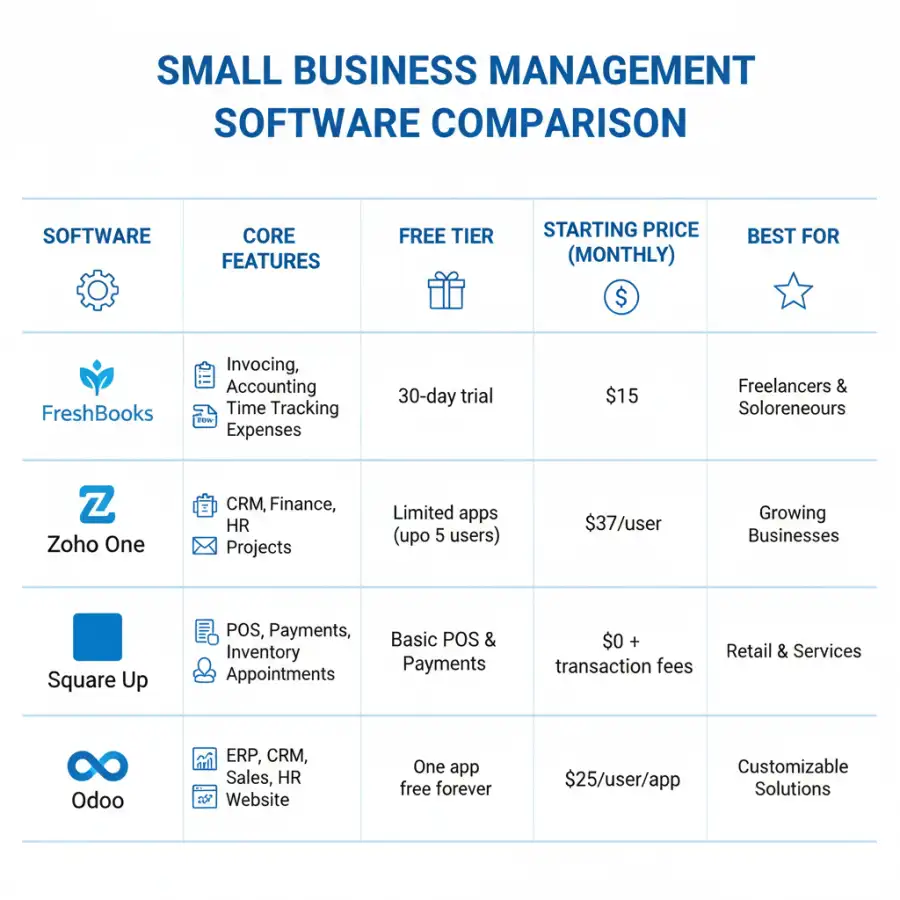
Zoho One
- Features: A truly comprehensive suite offering over 45 applications, including CRM, project management, accounting, HR, marketing, email, and more. Integrates deeply across all its apps.
- Pricing: All-Employee Pricing ($37/employee/month, billed annually) or Flexible User Pricing ($45/user/month, billed annually). Often cheaper than subscribing to multiple individual Zoho apps.
- Pros: Unbeatable value for the sheer number of applications, deep integration between apps, scalable, caters to almost every business need.
- Cons: Can have a steep learning curve due to the vast number of apps, some individual apps might not be as feature-rich as dedicated competitors, interface can feel inconsistent across apps.
ClickUp
- Features: A highly versatile platform for project management, task management, document creation, goal tracking, CRM, and more. Offers a wide range of views (list, board, calendar, Gantt, etc.) and deep customization.
- Pricing: Free Forever plan (limited features), Unlimited ($7/user/month), Business ($12/user/month), Enterprise. Billed annually.
- Pros: Extremely powerful and feature-rich, highly customizable, generous free tier, excellent for managing complex workflows, strong collaboration tools.
- Cons: Can feel overwhelming and complex for simpler needs, steeper learning curve, some advanced features are only in higher tiers.
When comparing these platforms, consider not just the features list, but also how well their interface aligns with your team's existing workflow and technical proficiency. Does the promise of an all-in-one solution truly translate into streamlined operations, or does it sometimes lead to underutilized features and unnecessary complexity for a small team?
Best Free Management Software Options for Growing Businesses
For startups and small businesses operating on tight budgets, free management software options can significantly impact their operations. While often offering fewer features or user limits, these tools provide essential functionalities that can significantly boost productivity without immediate financial outlay. The trick is knowing which free tiers truly deliver value.
Trello
- Features: A highly visual Kanban-style project management tool. Organize tasks into boards, lists, and cards. Great for simple project tracking, editorial calendars, and team collaboration.
- Pricing: Free (unlimited cards, 10 boards per workspace, basic automation), Standard ($5/user/month), Premium ($10/user/month), Enterprise. Billed annually.
- Pros: Incredibly easy to use, highly intuitive, excellent for visual thinkers, great for small teams and simple workflows.
- Cons: Limited for complex projects, not an all-in-one solution, automation and advanced features are locked behind paid tiers.
Asana
- Features: A robust project and task management tool. Offers list, board, and calendar views. Good for task assignment, deadline tracking, and simple project planning.
- Pricing: Basic (Free for up to 15 users, unlimited tasks, basic reporting), Premium ($10.99/user/month), Business ($24.99/user/month), Enterprise. Billed annually.
- Pros: Generous free tier for small teams, strong task management, good for organizing team workflows, integrates with many other tools.
- Cons: Can be less intuitive than Trello for pure visual management, advanced features like Portfolios and Workload are paid, not a true all-in-one.
Jira (for software development teams)
- Features: While often associated with larger tech teams, Jira offers a free tier for up to 10 users. Specializes in Agile project management (Scrum, Kanban), bug tracking, and issue management.
- Pricing: Free (up to 10 users, 2GB storage), Standard ($7.75/user/month), Premium ($15.25/user/month), Enterprise.
- Pros: Industry-standard for software development, robust tracking and reporting, highly customizable workflows, powerful integrations.
- Cons: Steep learning curve for non-technical users, features can be overkill for non-software businesses, free tier is limited.
Google Workspace (Free Tier Equivalent)
- Features: While not a single "management software," the suite of free Google tools (Docs, Sheets, Drive, Calendar, Meet, Gmail) can function as a powerful, albeit piecemeal, management system for very small businesses.
- Pricing: Free for individual use, paid tiers for business features and custom domains.
- Pros: Widely familiar, excellent collaboration on documents, generous storage, cost-free.
- Cons: Lacks integrated project management dashboards, requires manual linking of different tools, not an all-in-one solution.
These free options are ideal for businesses just starting out or those with very specific, limited needs. However, it's essential to consider their scalability. Will a free tool truly support my business as it grows, or will I eventually hit a ceiling that forces an expensive, disruptive migration?

What this means for you
For you, the small business owner, navigating the crowded market of management software means making a strategic choice that can profoundly impact your operational efficiency, team productivity, and financial health. It's about finding a digital partner that genuinely supports your growth, rather than becoming another administrative burden.
Firstly, this comparison empowers you to **identify your true needs**. By understanding the range of features available and seeing how different platforms package them, you can clearly articulate what your business absolutely requires versus what would be 'nice to have.' This clarity prevents you from overpaying for features you'll never use or, conversely, selecting a tool that quickly becomes insufficient. Secondly, it allows for **informed budget allocation**. Whether you're seeking a robust free solution or are ready to invest in an all-in-one powerhouse, you now have a clearer picture of typical pricing models and what value each tier offers. This insight is crucial for maximizing your return on investment, as highlighted by discussions around the ROI revolution in cost-benefit analysis of SaaS tools.
Moreover, this guide provides a foundation for **future scalability**. A good software choice isn't just for today; it should be able to grow with your business. By evaluating the upgrade paths and integration capabilities of different platforms, you can make a decision that minimizes future disruption. Ultimately, it means you can move forward with confidence, knowing you've considered the pros and cons, features, and user experiences of leading contenders. Your time is valuable; spending it wisely on selecting the right tools allows you to reclaim hours for innovation and client engagement. Can a single software truly adapt to every twist and turn of a growing small business, or is flexibility through integrations the ultimate solution?
Risks, trade-offs, and blind spots
While the benefits of adopting management software are undeniable, overlooking potential risks, trade-offs, and common blind spots can lead to frustrating experiences and wasted resources. A critical examination of these aspects is essential for a smooth integration and long-term success.
Risks and Trade-offs:
- Overwhelm and Underutilization: All-in-one solutions, while powerful, can be overwhelming for small teams. The risk is that you pay for a vast array of features, but only a fraction are actively used, leading to an inefficient allocation of resources.
- Steep Learning Curves: Some sophisticated platforms, especially those with deep customization, require a significant time investment to learn and master. This can reduce immediate productivity and cause team resistance.
- Vendor Lock-in and Data Migration: Committing to a comprehensive platform can lead to vendor lock-in. Migrating data to a different system later can be complex, time-consuming, and costly, creating a significant barrier to switching providers.
- Hidden Costs: While free tiers are appealing, they often come with limitations on users, storage, or advanced features. Upgrading to a paid plan can reveal higher-than-anticipated costs, particularly as your team grows or you require more functionalities.
- Integration Challenges: Even with strong integration capabilities, ensuring seamless data flow between your management software and other essential tools (like specialized SaaS accounting platforms) can be challenging and require technical expertise.
Common Blind Spots:
- Ignoring Team Buy-in: Implementing new software without involving your team in the selection and training process can lead to low adoption rates and resistance, rendering the investment ineffective.
- Underestimating Customization Needs: Assuming an off-the-shelf solution will fit perfectly can be a mistake. Many businesses have unique workflows that require a degree of customization, which can add cost and complexity.
- Neglecting Security and Data Privacy: Forgetting to scrutinize a software's security protocols, data backup policies, and compliance with privacy regulations (e.g., GDPR) can expose your business to significant risks.
- Scalability Blindness: Choosing a system that only meets current needs without considering future growth can lead to costly and disruptive migrations down the line.
- Over-reliance on Reviews: While helpful, online reviews (like those on Reddit) should be balanced with a thorough understanding of your own business's specific requirements. What works for one small business might not work for yours.
Given the array of potential pitfalls, is it truly possible for a small business to make a perfect software choice on its first attempt, or is it an iterative process of learning and adaptation?

Main points
Selecting the best management software is a pivotal decision for any small business looking to enhance efficiency and foster growth. Here are the main points to consider for a strategic choice:
- The modern landscape favors integrated, cloud-based solutions that consolidate various business functions into a single platform.
- Essential features include robust project and task management, client/contact management (CRM), invoicing, reporting, and effective communication tools.
- Top all-in-one solutions like monday.com, Zoho One, and ClickUp offer comprehensive suites with varying degrees of customization, suitable for diverse business needs.
- Valuable free options like Trello, Asana, and the Google Workspace suite provide essential functionalities for startups or businesses with simpler requirements, but often have limitations.
- Align your software choice with your specific business needs and growth trajectory to avoid feature bloat or premature scalability issues.
- Be aware of potential risks such as steep learning curves, hidden costs associated with scaling, and the challenges of vendor lock-in and data migration.
- Prioritize team buy-in during selection and implementation to ensure high adoption rates and maximize the software's benefits.
- Always consider the software's security features and data privacy compliance to protect your business and client information.
Your choice of management software isn't just a purchase; it's an investment in your business's future. By carefully weighing the features, costs, pros, and cons of these leading platforms, you can select a solution that truly streamlines your operations, empowers your team, and sets the stage for sustainable growth and success.