

Deploying Your Cloudways Apps: A Complete Guide
A step-by-step guide to deploying applications on Cloudways using Git.
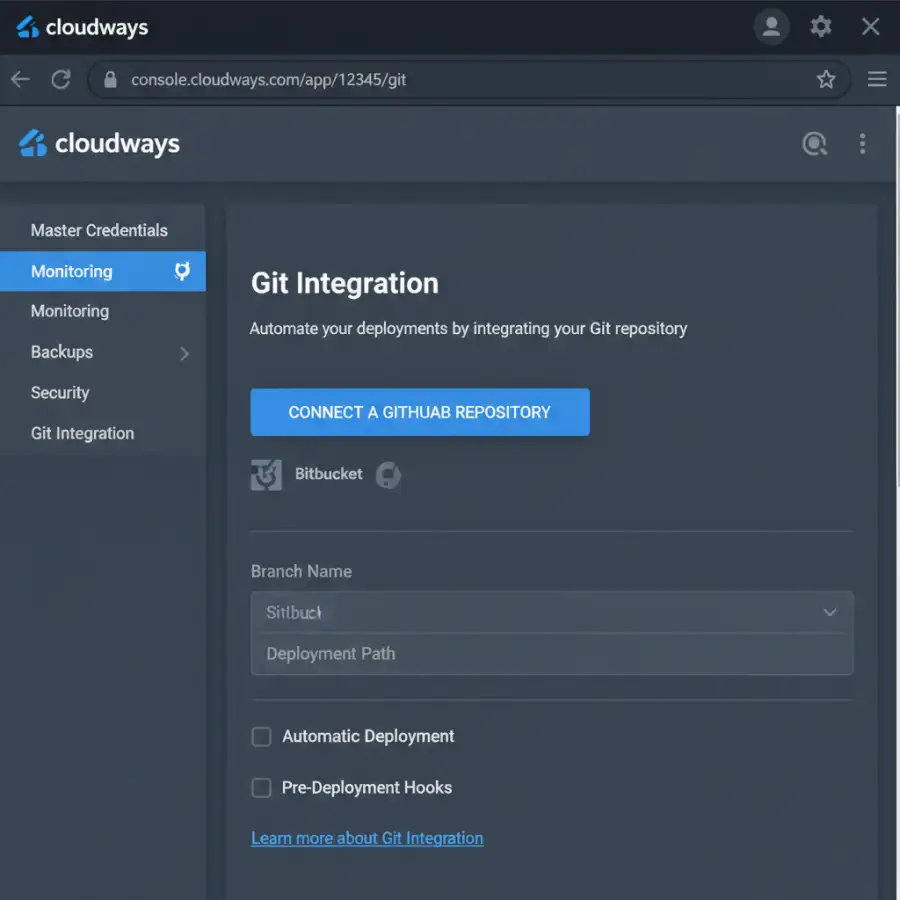
Do you want to simplify your app deployment? Use Git with Cloudways. It offers an easy and effective way to manage your applications. Updates deploy quickly and reliably.
Whether you are new or experienced, learn how to deploy your apps on Cloudways using Git. This will save you time and reduce errors.
This guide will show you every step. You will learn to deploy your applications efficiently and confidently.
Cloudways simplifies web hosting with a managed cloud hosting platform. A key benefit is Git deployment support. This lets developers easily deploy and manage applications from a Git repository. This approach improves the development workflow. It enables version control and automated deployments. This guide covers deploying your applications to Cloudways using Git. It includes setup and best practices for continuous integration and deployment (CI/CD).
This guide explains how to deploy applications on Cloudways using Git. It covers setup, deployment, and optimization. The main topic is "Cloudways git deployment".
Quick navigation
Setting Up Your Cloudways Server
Before you deploy your application, set up a server on Cloudways. Choose your application (e.g., PHP, WordPress, Laravel). Select a cloud provider (e.g., AWS, Google Cloud, DigitalOcean). Configure your server settings.
First, log in to your Cloudways account. If you don't have an account, sign up. Then, go to the server creation section. Follow these steps:
- Select your application type (e.g., PHP, Laravel, WordPress).
- Choose your cloud provider.
- Select the server size and location. Base this on your application's needs.
- Configure the server settings, such as PHP version and database.
- Launch your server. This may take a few minutes.
Did your server setup go well? After the server runs, connect your Git repository.
Connecting Your Git Repository
Connecting your Git repository to Cloudways is important. It lets you deploy updates easily. Cloudways supports GitHub and Bitbucket for repository integration.
To connect your repository:
- Log in to your Cloudways account. Select your server.
- Choose your application.
- Go to the "Deployment" section.
- Click on "Deploy from Git".
- Select your Git provider (GitHub or Bitbucket). Authorize Cloudways to access your repositories.
- Choose your repository and the branch to deploy (usually `main` or `master`).
- Configure any deployment settings (e.g., deployment path).
- Deploy your application.
Did you have issues? Make sure you gave Cloudways the right permissions to access your repository. Ensure your repository is set up correctly.
Deploying Your Application
Once your Git repository is connected, deploy your application. This pulls the latest code from your repository and deploys it to your server. Deployment happens manually or automatically with CI/CD pipelines.
To deploy manually:
- In the Cloudways dashboard, go to your application.
- Go to the “Deployment” section.
- Click on "Deploy".
- Cloudways will pull the latest code from your Git branch and deploy it.
Are you deploying the right branch? Select the correct branch. Make sure the deployment works. If you get errors, check the deployment logs for details.
Understanding Git Branching Strategies
Understanding Git branching strategies is important for efficient application deployment and version control. Branching lets you work on new features, bug fixes, or experiments. Do this without affecting the main codebase.
Here are some common branching strategies:
- Gitflow: This model uses feature branches, develop branches, release branches, and hotfix branches. It is good for managing multiple releases and complex projects.
- GitHub Flow: This model is simpler. It is designed for continuous deployment. Create feature branches from `main`. Deploy directly when the feature branch merges back into `main`.
- Trunk-Based Development: Developers add code to the `main` branch often, sometimes daily. This model uses short-lived feature branches and frequent merges.
Did you pick the right branching strategy? Choose the right strategy for your project. Think about the size and complexity of your project. Consider your team's workflow. Decide which is best.
Automating Deployments with CI/CD
Use a CI/CD pipeline to automate building, testing, and deploying your application. This reduces manual work and errors. It ensures updates deploy consistently and efficiently.
Here are key steps to set up CI/CD for Cloudways:
- Choose a CI/CD tool: Options include GitHub Actions, GitLab CI, and Bitbucket Pipelines.
- Configure your CI/CD pipeline: Create a configuration file (e.g., `github-actions.yml`) in your repository.
- Define your build steps: These steps install dependencies (e.g., `npm install` or `composer install`). They run tests and prepare your application for deployment.
- Configure deployment steps: Use the Cloudways API or SSH to automate deployment.
- Test and deploy: After the build and test stages, the pipeline deploys to Cloudways.
Is your CI/CD pipeline set up correctly? Check that your pipeline builds, tests, and deploys your application to Cloudways. Watch logs and notifications to fix any issues.
Monitoring and Optimizing Your Deployment
After you deploy your application, monitor its performance. Optimize it to make sure it runs well. Performance optimization makes your app faster, more reliable, and able to handle more traffic.
Here is what you should monitor:
- Server resources: Watch CPU usage, memory consumption, disk I/O, and network traffic. Cloudways has monitoring tools for these metrics.
- Application performance: Use tools like New Relic or Cloudways monitoring. Track response times, errors, and database performance.
- Error logs: Check error logs to find and fix any issues. These issues might affect your application.
Are you ready for problems? Monitor your application. Quickly find and fix performance issues.
What this means for you
Deploying your applications to Cloudways using Git offers several benefits for you and your team. This process can improve your development workflow. It makes deployments faster, more reliable, and easier to manage.
This approach improves your development workflow, including:
- Faster deployments: Automating deployments reduces the time and effort to get your updates live.
- Version control: Git tracks changes. You can roll back to previous versions if needed.
- Collaboration: Git helps developers work together. It makes it easier to manage code changes.
How will these improvements change your daily routine? Git deployment streamlines the entire process. You can focus on developing features and improvements instead of deployment logistics.
Risks, trade-offs, and blind spots
Deploying with Git has many advantages. Be aware of the risks, trade-offs, and potential issues. Knowing these things helps you make good decisions. It helps you avoid potential problems.
Here are some key points to consider:
- Complexity: Setting up Git and CI/CD pipelines can be complex. This is especially true if you are new to these technologies.
- Security: Make sure your Git repository is secure.
- Downtime: Plan for downtime during deployments. This is especially true if you are not using a zero-downtime deployment strategy.
Do you understand the potential issues? Knowing these risks will help you prepare your deployment process. You can handle any problems that come up.
Main points
Deploying to Cloudways using Git is an easy way to manage application deployments. Follow the steps in this guide. You can set up, connect, and deploy your applications successfully.
- Setting up: Create a Cloudways server. Select your application.
- Connect repository: Connect your Git repository (GitHub or Bitbucket).
- Deployment: Deploy the application using the Cloudways dashboard or CI/CD pipelines.
- Branching: Understand and use Git branching strategies (Gitflow, GitHub Flow, Trunk-Based Development).
- Automation: Automate deployment using CI/CD pipelines.
- Monitor: Monitor server resources and application performance.
- Optimize: Optimize performance using monitoring tools and best practices.
Are you ready to deploy? Use Git and Cloudways. This will make your application deployments efficient and reliable. It will also speed up your development process. For more information, see Navigating Digital Campus – Your Ultimate Guide.