

How Phishing Attacks Trick Users: A Comprehensive Guide
Learn how to identify, prevent, and protect yourself from phishing scams.
Have you ever received an email that seemed legitimate but felt a little… off? You’re not alone. Phishing attacks are becoming increasingly sophisticated, preying on our trust and curiosity.
From fake emails to malicious websites, understanding how these attacks work is the first step in protecting yourself. This guide will equip you with the knowledge to spot and stop phishing attempts in their tracks.
Prepare to become a phishing-fighting pro. Let's dive in and learn how to stay secure in an ever-evolving digital landscape.
Phishing attacks are a constant threat in the digital age. They are designed to steal information like usernames, passwords, and credit card details. This guide explains how these attacks work, how to recognize them, and how to protect yourself. The goal is to give you a complete understanding of phishing. You can then use this knowledge to safely use the internet. Understanding these threats is important for protecting your privacy and finances. Let's explore how phishing attacks trick users, and what you can do.
Quick navigation
What this means for you
Phishing attacks are risky for individuals and organizations. For individuals, the results can be financial loss and identity theft. Your information could be used for fraud. This can lead to stress and financial problems. Imagine the frustration of dealing with fake credit card charges. Think about the effort needed to restore your online accounts after a data breach. The effects of a successful phishing attack can be far-reaching and personal. It is about protecting your digital identity and peace of mind.
For organizations, the stakes are also high. A successful phishing attack can lead to data breaches, damage to reputation, and financial losses. A single hacked employee account can give attackers access to company data. This includes customer information, financial records, and intellectual property. The consequences can include legal issues, fines, and a loss of customer trust. A data breach can severely damage an organization's reputation. This makes it difficult to get and keep customers. The loss of productivity and the cost of fixing the problem can be high. Protecting your organization from phishing is essential for long-term success. Protecting yourself and your organization means being alert, informed, and taking action against these threats.
How Phishing Attacks Work
Phishing attacks use deception and social engineering. Attackers use different methods to trick people into giving away information or doing things that hurt their security. Understanding how these attacks work is important for defending against them. Attackers are always changing their methods. Staying informed is key to staying safe. The main goal is to trick a user, not to break into systems directly. The success of a phishing attack often depends on the attacker's ability to create a sense of urgency, fear, or trust. They manipulate the recipient to act quickly without thinking.
The process usually starts with the attacker creating a deceptive message. This is often an email, text message, or social media post. The message may pretend to be from a real organization, such as a bank or a government agency. The message often includes a call to action. You might be asked to click on a link, download an attachment, or provide personal information. Attackers use sophisticated methods to make the message look real. They may copy the branding, logos, and language of the organization. Some attacks use hacked email accounts of people you know to seem more trustworthy.
When a user clicks on a malicious link or opens an infected attachment, they are taken to a fake website, or malware is installed on their device. Fake websites are designed to look like real sites. These might be the login page of a bank or an online store. If a user enters their credentials on a fake website, the attacker can steal their username and password. Infected attachments may contain malware that steals information, locks files for ransom, or gives the attacker access to the user's system. Attackers also use spear phishing. This involves targeting specific people or organizations with personalized messages. This makes it more likely that they will fall for the scam. Understanding how phishing attacks work helps you recognize the warning signs. You can then protect yourself from these threats.
Identifying Phishing Attempts: Key Indicators
Recognizing phishing attempts is the first step in defending yourself. Phishing attacks have clues, and learning to spot these clues can reduce your risk. Can you tell the difference between a real email and a phishing attempt at a glance? Many phishing attempts have common features. Learning to identify them can help you spot the danger before you click.
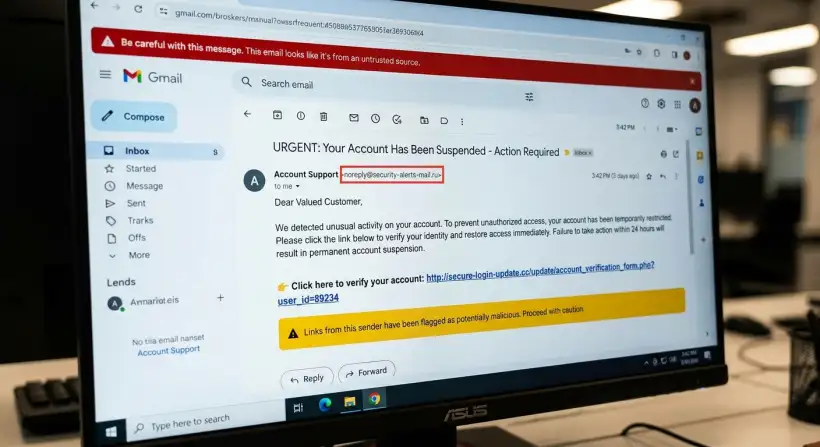
One common warning sign is the sender's email address. Phishers often use addresses that are slightly different from the real ones. This could include typos, changes in the domain name, or generic email addresses. Always check the sender's email address carefully before you do anything. Be careful of generic greetings, such as "Dear Customer." Real organizations usually use your name. If the email includes a sense of urgency or threats, be extra cautious. Phishers often use this to pressure you into acting quickly. If an email asks for personal information, such as your password, bank account details, or social security number, be very suspicious.
Poor grammar and spelling mistakes are common in phishing emails. Real organizations usually have teams that check their communications. Another tactic is to hover over links before clicking on them. This lets you see the actual URL. If the URL looks suspicious, do not click on it. Verify the email by contacting the sender directly. Do not use the contact information in the suspicious email. Use the contact information you already have.
Here are common indicators:
- Suspicious Sender Address: Examine the email address carefully for typos or variations.
- Generic Greetings: Real emails often use your name, not generic greetings.
- Sense of Urgency: Be careful of threats or deadlines.
- Requests for Personal Information: Never give sensitive data in response to an unsolicited email.
- Poor Grammar and Spelling: Look for mistakes that show a lack of professionalism.
- Suspicious Links: Hover over links to check the URL before clicking.
Types of Phishing Attacks
Phishing attacks come in different forms. Each one is designed to exploit different weaknesses. Understanding these different types of attacks can help you defend against them. Do you know the difference between spear phishing and whaling? Here's a look at the different types:
Email Phishing is the most common form. Attackers send emails that seem to come from real organizations. These emails often have links to fake websites or ask for personal information. The goal is to trick the recipient into giving sensitive data, such as usernames, passwords, or financial details. Spear phishing is a more targeted type of email phishing. Attackers research their targets and create personalized emails to increase their chances of success. The emails often appear to come from someone the target knows or trusts, like a colleague or friend. Whaling is a type of spear phishing that targets important people. These might be executives or celebrities. The attackers want to steal valuable information or get access to important systems. Smishing, or SMS phishing, uses text messages to trick victims. The messages often have links to fake websites or ask the recipient to call a fake phone number. Vishing, or voice phishing, uses phone calls to deceive victims. Attackers may pretend to be bank employees or technical support representatives to get personal information.
Another common method is clone phishing. This involves creating a copy of a real email and replacing the links or attachments with malicious ones. The attackers then send the cloned email to the original recipient or to others. A more advanced form is business email compromise (BEC). Attackers get access to a business email account. They then pretend to be the account holder to request fraudulent money transfers or sensitive information. This is often part of a larger criminal operation. Being aware of the different types of phishing attacks lets you recognize the tactics used by attackers and protect yourself.
Preventive Measures: Protecting Yourself and Your Organization
Protecting yourself and your organization from phishing attacks needs a multi-layered approach. You can take steps to reduce your risk. Are you using a password manager? A key part of preventing phishing is taking action to secure your systems. Here is how to create a strong defense:
First, be careful about emails and messages you did not ask for. Verify the sender's identity and be wary of links or attachments. Regularly update your software and operating systems. This helps fix known weaknesses that attackers can use. Use strong, unique passwords for all your online accounts. Consider using a password manager to securely store and manage your passwords. Enable multi-factor authentication (MFA) on all accounts that support it. MFA adds extra security by requiring a second way to verify your identity. This might be a code sent to your phone. Use reliable antivirus and anti-malware software. This can help to find and block malicious software that attackers might try to install on your devices. Educate yourself and others about phishing attacks. Be aware of the common tactics used by attackers. Keep up-to-date on the latest threats.
For organizations, provide regular security awareness training to employees. Simulate phishing attacks to test their awareness and find weaknesses. Use email filtering and spam detection tools. These tools can help block or quarantine suspicious emails before employees see them. Set clear policies and procedures for handling sensitive information. Make sure employees understand the importance of protecting data. Regularly back up your data and systems. This can help you recover from a successful phishing attack or data breach. By taking these steps, you can create a strong defense against phishing attacks.
Risks, trade-offs, and blind spots
Preventive measures can reduce the risk of phishing attacks. It is important to know about the risks, trade-offs, and possible problems. Understanding these factors can help you make smart decisions about your security. Are you aware of the downsides of relying only on technology?
One possible problem is relying too much on technology. Security software and tools are essential, but they are not perfect. Attackers are always creating new tactics to get around these defenses. There is a trade-off between convenience and security. Some security measures, like MFA, can add more protection. They can also make things harder for users. It is important to find a balance between security and ease of use. Human error is another major risk. People can still be tricked into falling for phishing scams. Security awareness training is essential to reduce this risk. The constant change of phishing techniques is a challenge. Attackers are always improving their methods. Staying up-to-date on the latest threats is crucial.
There is also the risk of being too relaxed. Once you have security measures in place, it can be easy to become too relaxed. Regularly review and update your security practices to make sure they still work. A complete security strategy needs a combination of technology, security awareness training, and being alert. It is important to check your risk and make adjustments to stay protected.
Main points
Phishing attacks are a serious threat. It is important to understand the risks and how to protect yourself. Here are the main points to help you stay safe:
- Be careful of emails, messages, and calls you did not ask for. Be especially careful of those that ask for personal information or require you to act immediately.
- Always check the sender's identity, especially when financial information is involved.
- Regularly update your software, use strong passwords, and enable multi-factor authentication.
- Stay informed about the latest phishing tactics and scams.
- Use security awareness training in your organization.
- Use reliable anti-virus and anti-malware software to protect your devices.
- Report any suspicious activity to the right authorities.
- Regularly back up your data to prevent data loss.
You can greatly reduce your risk of a phishing attack by being alert and informed. Take action today, and make your digital life more secure!