
How to Backup Your Data: A Comprehensive Guide to Protecting Your Digital Life
Safeguard your valuable information with these essential data backup strategies.
Your digital life is precious. It is filled with memories, important documents, and critical information. What would happen if you lost it all?
Data loss can strike unexpectedly. It can come from hardware failure, cyberattacks, or simple human error. Do not let a disaster wipe out your digital world.
This guide gives you the knowledge and tools you need. Use them to implement a strong data backup strategy. This will ensure your peace of mind.
Data is everything in today's digital age. Your life is increasingly stored in digital formats. This includes family photos, financial records, work documents, and creative projects. This guide will help you understand how to back up your data effectively. It provides steps and best practices to protect your valuable information against any potential loss. Data backup is essential. It is a crucial step in protecting your digital assets.
Quick navigation
Why Data Backup is Essential
Data loss can happen in many ways. Hardware failures, like hard drive crashes, are common. Cyberattacks, like ransomware, can encrypt your data and hold it hostage. Natural disasters, such as fires or floods, can destroy your devices and data. Even human errors, like accidental deletion, can lead to significant data loss. Is your data protected?
The consequences of data loss can be devastating. Individuals can lose irreplaceable memories, important documents, and financial records. Businesses can face lost revenue, legal liabilities, and damage to their reputation. A strong data backup strategy is not just a convenience. It is a necessity in today's digital world.
Understanding Backup Types
There are several types of backups. Each has its own advantages and disadvantages. Understanding these different types is key to designing an effective backup strategy.
- Full Backup: This copies all selected data to the backup medium. It provides the most complete protection. It takes the longest time to do.
- Incremental Backup: This backs up only the data that has changed since the last backup. This can be a full or incremental backup. It is faster than a full backup. It requires the previous backups to restore data.
- Differential Backup: This backs up only the data that has changed since the last full backup. It is faster than a full backup. Restoration is quicker than with incremental backups. You only need the full backup and the latest differential backup.
The 3-2-1 Backup Rule
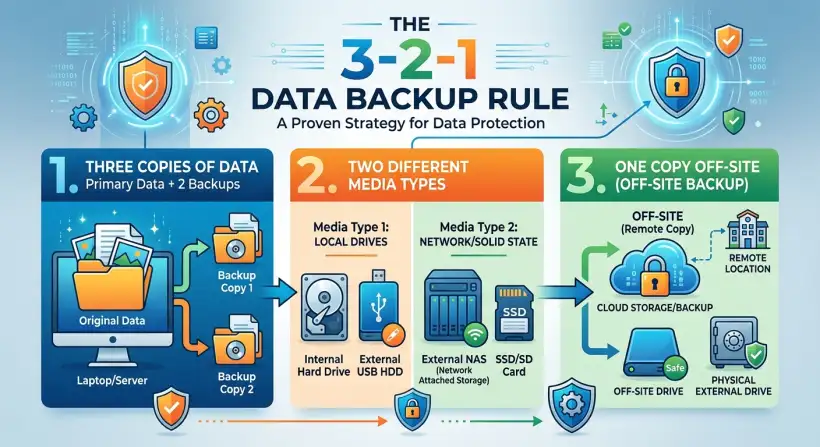
The 3-2-1 backup rule is a well-known best practice for data protection. It gives a simple but effective framework for ensuring data safety. Have you implemented this rule?
- 3 Copies: Keep three copies of your data. This includes your original data and two backups.
- 2 Different Media: Store the backups on two different storage media. Examples are hard drives, cloud, and USB drives.
- 1 Offsite: Keep one copy of your data offsite. This can be in the cloud or at a different physical location. This protects against local disasters like fire or theft.
Backup Methods and Platforms
Several methods and platforms can back up data. The best choice depends on your needs, the amount of data, and your budget. Which method is right for you?
- Local Backups: These back up data to an external hard drive, USB drive, or network-attached storage (NAS) device. They offer fast access and are cost-effective. They are vulnerable to physical damage or theft.
- PC and Laptop Backup Software: Software like Acronis, Backblaze, and EaseUS Todo Backup can automate backups. They offer features like incremental backups, scheduling, and encryption.
- Mobile Device Backups: Smartphones and tablets can be backed up to a computer or the cloud. Both iOS and Android devices offer built-in backup solutions.
Cloud Backup Solutions
Cloud backup solutions offer a convenient and secure way to back up your data offsite. They provide automatic backups, scalability, and accessibility from anywhere with an internet connection. Are you using the cloud to your advantage?
- Advantages: Offsite storage, automatic backups, accessibility, scalability, and often, strong security measures.
- Popular Services: Consider services like Backblaze, Carbonite, Google Drive, Microsoft OneDrive, and Dropbox.
- Considerations: Evaluate the provider's security measures, storage limits, pricing, and ease of use. Ensure they offer features like encryption and versioning.
Data Backup Security
Data security is critical for any backup strategy. Your backups are only as secure as the measures you take to protect them. How are you protecting your backups?
- Encryption: Encrypt your backups to protect against unauthorized access.
- Password Protection: Use strong, unique passwords to protect your backup accounts.
- Multi-Factor Authentication (MFA): Enable MFA whenever possible to add extra security.
- Regular Updates: Keep your backup software and operating systems updated. This will patch security vulnerabilities.
What this means for you
Implementing a data backup strategy is not a one-time task. It is an ongoing process. Review and update your backup plan regularly. This will ensure it protects your data. Following the best practices in this guide can reduce the risk of data loss. It will safeguard your valuable information.
Risks, trade-offs, and blind spots
Consider potential risks and trade-offs. One blind spot could be not testing your backups. Test your backups to ensure they work. Another risk is relying on a single backup solution. Combine local and cloud backups to reduce this risk. Finally, failing to encrypt your backups can leave your data vulnerable to access.
Main points
- Backups are crucial for protecting your data from various threats. These include hardware failures, cyberattacks, and human error.
- Understand the different types of backups. These are full, incremental, and differential.
- Implement the 3-2-1 backup rule for complete data protection.
- Choose the right backup methods and platforms. These include local backups and cloud solutions.
- Prioritize data security. Use encryption, strong passwords, and multi-factor authentication.
- Test your backups regularly to ensure they work.
- Combine local and cloud backups to diversify your backup strategy.
Protecting your data requires diligence and attention to detail. Implement these strategies. You can then create a strong backup plan that safeguards your digital assets. For more information, explore digital campus navigation or learn more about financial technology.