

I Tested My Cloud Security: A Practical Guide to Safeguarding Your Data
Understand and improve your cloud security posture with actionable steps.
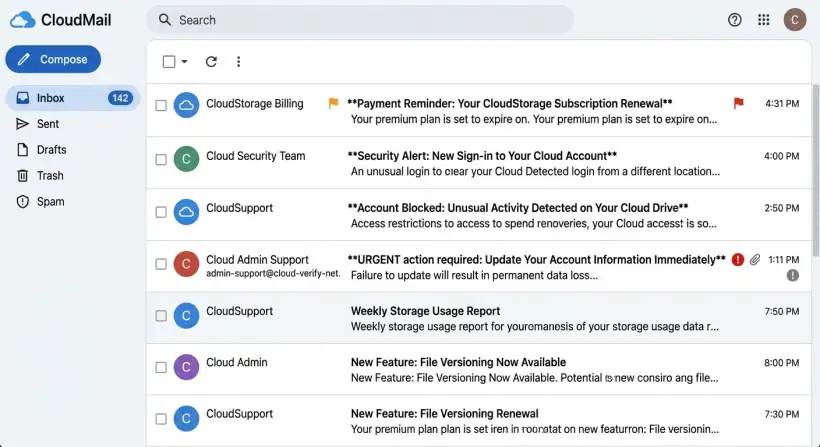
Cloud storage is convenient, but are you truly in control? Test your cloud security to see how well your data is protected.
The cloud can be confusing. This guide helps you understand your risks.
We will explore practical steps to find vulnerabilities. Get ready to take charge of your digital life!
Cloud storage is a necessary part of modern life. It offers convenience and access. However, you must secure your data. This guide shows how I tested my cloud security. It also gives advice to protect your information. This article is for you if you receive alerts or deal with suspicious emails. It is also for anyone who wants to understand cloud security.
This guide gives you the knowledge and tools you need to use the cloud safely. You can benefit from the cloud while lowering the risks. Let's explore cloud security to keep your digital assets safe.
Quick navigation
Understanding Your Cloud Security Posture
You must understand your current cloud security before testing. Identify the cloud services you use and the data you store. Also, know your security measures. Do you know where your data is? Are you using strong passwords and multi-factor authentication (MFA)? Understanding your baseline helps you find gaps and improve. A complete assessment is the first step.
Think about the different types of cloud services you use. This can include file storage like Dropbox or Google Drive. It can also include email like Gmail and Outlook. Make a list of all your cloud accounts. Then, analyze the data in each service. What would happen if that data was compromised? This will help you prioritize your security efforts. Focus on the most important information first.
Next, evaluate the security features of each service. Are you using MFA? Have you enabled encryption? Do you review access permissions regularly? Make sure you use these security tools. Understanding each service's capabilities is essential.
Recognizing Cloud Security Threats
Cloud security threats can compromise your data and privacy. Phishing attacks, malware, and data breaches are common risks. Recognizing these threats is important to protect yourself. Are you aware of the different tactics attackers use?
Phishing attacks are a frequent way to breach cloud security. Attackers use fake emails, messages, or websites. They trick you into revealing sensitive information, like passwords. These emails often look legitimate. Be cautious about clicking links or opening attachments from unknown senders.
Malware can also be a threat. This software can be disguised as legitimate files or programs. It can infect your devices, letting attackers access your cloud accounts. Data breaches can expose your data. They happen because of vulnerabilities or attacks on your accounts. Stay informed about security incidents and protect yourself.
Identifying Legitimate Cloud Emails
It is important to tell the difference between real and phishing emails. Legitimate cloud service providers will send you emails for account updates, billing, and security alerts. Phishing emails try to trick you into revealing your credentials or installing malware. How can you tell the difference?
Examine the sender's address. Real emails usually come from a verified domain. Phishing emails often use similar addresses or generic domains. Always check the sender's email address and hover over links before clicking. Look for inconsistencies in the email's content and design. Phishing emails often have errors and urgent requests.
Verify the email's legitimacy. If you are unsure, go to the cloud service's website or app. Check your account for any notifications or alerts. Avoid clicking links in the email. Log in to your account through the official website. If you get a suspicious email, report it to the cloud service provider and your IT department.
What this means for you
You must understand and secure your cloud accounts. Cyber threats are becoming more sophisticated. Individuals and businesses must protect their data. Not doing so can cause financial losses and legal issues. What can you do today?
You can lower the risk of your cloud accounts being compromised. Implement the security measures in this guide. This means being more aware of the cloud services you use and how they protect you. Use strong passwords, enable MFA, and watch out for phishing attacks. You are protecting yourself and the people you do business with.
Taking control of your cloud security means controlling your digital life. It is about protecting your privacy and data. You can ensure your cloud experience is safe. Adopt a proactive approach and stay informed about the latest security threats.
Risks, trade-offs, and blind spots
The cloud offers benefits. However, be aware of the risks, trade-offs, and potential blind spots. Understanding these helps you make informed decisions about cloud services. Also, it helps you protect yourself. Are you aware of what you give up when storing data in the cloud?
One primary risk is data breaches. No cloud service is safe from cyberattacks. Your data may be vulnerable. The trade-off involves giving up control of your data. This is for the convenience of cloud services. Understand the security policies of your cloud providers.
Another blind spot is the shared responsibility model. Cloud providers secure the infrastructure. You secure your data and account. Often, the user is the weakest link. You can make informed decisions. Also, you can take steps to reduce the risks. Review your security practices and stay informed about threats. These are crucial.
Main points
Here is a summary of the key takeaways for securing your cloud data:
- Assess Your Current Security Posture: Identify cloud services, data, and existing security measures.
- Recognize Cloud Security Threats: Understand the risks of phishing, malware, and data breaches.
- Identify Legitimate Emails: Learn to differentiate between real and phishing emails by examining sender addresses and content.
- Use Strong Passwords: Implement complex, unique passwords for each cloud account.
- Enable Multi-Factor Authentication (MFA): Add an extra layer of security.
- Regularly Review Account Permissions: Ensure only authorized users have access to your data.
- Stay Informed: Keep up to date on the latest cloud security threats and best practices.
- Back Up Your Data: Implement a robust backup strategy.
Follow these steps and stay alert. You can lower your cloud security risks and protect your data. Start taking these measures today to ensure your cloud security.