
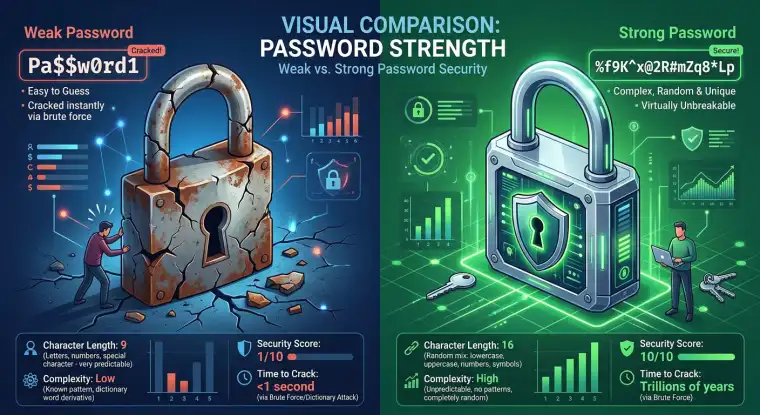
Why Password Managers Are Essential for Your Digital Security
Protecting your online life starts with a strong password strategy.
You have many online accounts. Remembering unique, complex passwords for each one can feel impossible.
Reusing passwords puts your digital life at risk from hackers and identity theft.
Password managers offer a simple, secure solution to protect your information.
Your online accounts need security in today's world. You have a growing digital footprint, from social media to banking, making you a target for cyber threats. Securing your passwords is key to protecting your data. A password manager is a critical tool. This guide explains why password managers are essential. It explores their benefits, clears up misunderstandings, and gives you advice on choosing one.
This section discusses the importance of digital security and how password managers help.
Quick navigation
What is a Password Manager?
A password manager is a software application. It stores and manages your passwords securely. It acts like a digital vault. It protects your passwords with a master password. You only need to remember one strong master password, which unlocks all your other credentials.
Password managers come as browser extensions, desktop applications, and mobile apps. They offer password generation, autofill, and secure password sharing. A password manager's main job is to improve your digital security. It simplifies password management and prevents password reuse across multiple accounts.
Why You Need a Password Manager
Strong password security is essential in today's digital world. Cyber threats change constantly. Weak password practices make you vulnerable. Reusing passwords is a common mistake. It creates a single point of failure. If one account is hacked, all accounts using that password become at risk.
Password managers solve this problem. They let you create strong, unique passwords for every account. You do not have to remember them. You can create long, complex passwords that resist hacking. Password managers also make it easier to manage your passwords. You can update them regularly without memorizing them or writing them down. They also save time by autofilling login details.
Are you tired of remembering many passwords? Do you reuse the same password on different websites? If so, you need a password manager.
How Password Managers Work
Password managers use encryption to protect your passwords. Encryption turns your passwords into an unreadable format. Only the correct decryption key, your master password, can access them. This makes sure that even if a password manager's database is breached, the passwords stay secure.
When you sign up for a new account, a password manager can generate a strong, random password. It stores this password securely. The next time you visit that website, the password manager can fill in your login details automatically. This saves you time and ensures you use a unique password for each site.
Most password managers also offer two-factor authentication (2FA) support, password strength analysis, and secure password sharing. Using a password manager makes your passwords safer and streamlines your digital life.
What this means for you
A password manager lets you control your digital security. It simplifies creating and managing strong passwords. This reduces your risk of cyberattacks. A password manager stores your passwords securely. It helps prevent unauthorized access to your accounts. This protects your personal information and finances.
You can have peace of mind. Your online accounts are safe with strong, unique passwords. They are protected by a single master password. Password managers also save time by autofilling login details. They streamline your browsing. With a password manager, you no longer need to worry about the security risks of weak passwords.
Do you value your privacy and online security? Using a password manager is an important decision.
Risks, trade-offs, and blind spots
Password managers offer significant security benefits. But, there are potential risks and trade-offs. One concern is the password manager's security. If someone compromises the master password or if the password manager has security problems, all your passwords could be at risk. Choose a password manager with a strong security record.
Another trade-off is relying on a single master password. If you forget your master password, you might lose access to all your stored passwords. Some password managers have recovery options, but these can create security risks. Also, password managers might not work with all devices or applications. This can be inconvenient.
Some people worry about storing their passwords with a third-party service. Password managers encrypt your passwords. You still trust a company with your information. Research the password manager's privacy policy and security practices before using it.
Are you aware of the possible risks and limitations of password managers?
Choosing the Right Password Manager
Choosing the right password manager is important. Consider your needs and security requirements. Think about security features, like encryption methods and two-factor authentication support. Also, consider ease of use, like the user interface and browser extensions. Consider compatibility, like devices and operating systems. And, consider the price, such as free versus paid plans.
Research different password managers. Compare their features and security practices. Read reviews from other users. Look for password managers with a good reputation for security. Free password managers offer basic features. Paid versions often have advanced features like password sharing, data breach monitoring, and customer support. Carefully consider the trade-offs between free and paid options.
The best password manager meets your needs, provides strong security, and is easy for you to use. Make an informed decision based on your needs and preferences.
Do you know how to choose the perfect password manager for your needs?
Main points
- Password managers securely store and manage your passwords. They protect them with a master password.
- They let you create strong, unique passwords for every online account. This prevents password reuse.
- Password managers use encryption to protect your passwords. This protects them, even if the password manager's database is breached.
- They have features like password generation, autofill, and secure password sharing.
- Choose a password manager with strong security features and a good reputation.
- Consider your needs, ease of use, compatibility, and price when choosing a password manager.
- Password managers offer more convenience and efficiency by streamlining password management.
- They reduce the risks of weak passwords and lessen your chance of cyberattacks.
Using a password manager is a step toward protecting your digital life. Start today and protect your online accounts. Learn more about online security and how to further protect yourself and your data.