

Xbox Cloud Gaming: The Ultimate Review and Performance Test
Is Microsoft's cloud gaming service worth your time and money?
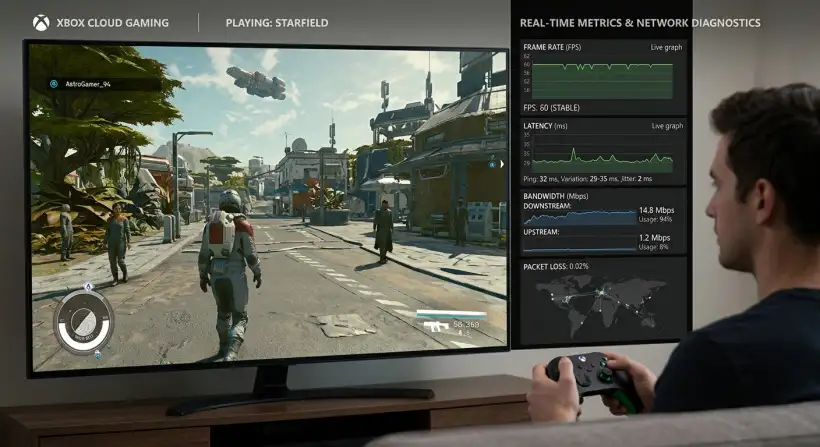
Do you want expensive consoles and long downloads? Xbox Cloud Gaming gives you instant access to hundreds of games on various devices.
But does it live up to the hype? We looked closely at cloud gaming to provide a complete review.
We'll help you decide if Xbox Cloud Gaming is right for you, from lag and picture quality to games and overall value.
Xbox Cloud Gaming, formerly xCloud, is Microsoft's move into game streaming. The service lets you play many Xbox games on phones, tablets, and PCs. You do not need a console or downloads. Is it the best way to game? This review looks at Xbox Cloud Gaming's performance, user experience, game library, and value. It will help you see if it's worth it for your gaming.
Quick navigation
What is Xbox Cloud Gaming?
Xbox Cloud Gaming is a game streaming service. It lets you play Xbox games on devices like Android phones and tablets, iPhones and iPads, Windows PCs, and some smart TVs. The service streams games from Microsoft's servers to your device. You do not need a console. You can play your favorite games on the go or on devices you might not use for gaming.
To use Xbox Cloud Gaming, you need an active Xbox Game Pass Ultimate subscription, a good internet connection, and a compatible device. A controller is also recommended for the best experience. Some games support touch controls.
Performance: Lag, Visual Quality, and Stability
The performance is the most important part of any cloud gaming service. How does Xbox Cloud Gaming do with lag, picture quality, and stability? It depends on your internet connection, device, and the game you are playing.
Lag: Input lag is the delay between pressing a button and seeing the action. The closer you are to Microsoft's servers and the better your internet, the less lag you will have. With a good connection, lag can be small and hard to notice. With a bad connection, lag can be big, making fast games hard or impossible to play.
Visual Quality: The picture quality is usually good. The service streams at up to 1080p and 60 frames per second. The picture quality depends on your internet speed and stability. A fast and stable connection will give you a clear picture. A weaker connection may cause issues.
Stability: The streaming connection must be stable. Disconnections or slowdowns can ruin the game. Microsoft has made improvements, but problems can happen, especially during busy times or with bad networks. A good cloud gaming experience needs a consistent, reliable performance.
User Experience Across Devices
The user experience of Xbox Cloud Gaming is different depending on your device. Here is a breakdown of the experience on the most common platforms:
Android: Android devices usually have a smooth and easy experience. The Xbox Game Pass app is available, and connecting a controller is simple. You can play on many devices, from phones to tablets.
iOS: iOS users use a web browser because of Apple's rules on cloud gaming apps. This can make the experience a little less smooth than on Android. Touch controls are available for some games, but a controller is recommended.
Windows PC: The experience is usually great on a Windows PC. A special app offers a smooth interface. This platform is best if you want to game on a big screen with a controller.
Smart TVs: Xbox Cloud Gaming is available on some smart TVs. The experience depends on the TV's processing power and internet.
Game Library and Selection
A big draw of Xbox Cloud Gaming is its large game library. Xbox Game Pass Ultimate subscribers can play a rotating selection of games from many genres. The library is updated with new releases. There is always something new to play. You will find many games available.
Not all Xbox Game Pass games are available on the cloud. Some games may only be on console or PC. Also, the games available can change. Always check the current game list before subscribing, especially if you want a specific game.
Pricing, Value, and Accessibility
You can only access Xbox Cloud Gaming through an Xbox Game Pass Ultimate subscription. The Ultimate tier also includes games on console and PC, and Xbox Live Gold. It is a good value for gamers who like to play on multiple platforms.
The cost of the subscription varies by region. It usually offers a good value, especially if you use the game library and cloud gaming. Think about the costs and benefits to see if it fits your gaming habits. You can compare this to the cost of buying games or a console to decide if it's the right choice for you.
What this means for you
Xbox Cloud Gaming is a good choice for gamers who want to play Xbox games on the go or without a console. It is a good choice if you have a reliable internet connection and want to try many games without buying them.
It might not be best for everyone. If your internet is slow or unreliable, the lag and picture quality may be bad. If you are a serious gamer who wants the best performance, a console or gaming PC may be better.
Risks, trade-offs, and blind spots
There are risks, trade-offs, and potential issues to consider with Xbox Cloud Gaming:
Internet Dependency: The biggest problem is that you need a stable and fast internet connection. Bad connections can ruin the experience.
Input Lag: Input lag is part of cloud gaming. It can be noticeable and affect gameplay.
Game Availability: The game library is big, but it is not the entire Xbox catalog. The selection changes.
Subscription Costs: You are locked into a subscription cost to access the games. You do not own the games, so you lose access when your subscription ends.
Device Compatibility: Make sure your devices work with the service before you subscribe.
Main points
- Performance Varies: Xbox Cloud Gaming's performance depends on your internet connection. A fast, stable connection is needed for a smooth experience.
- Device Flexibility: The service works on many devices, including smartphones, tablets, and PCs.
- Game Pass Ultimate Required: You need an Xbox Game Pass Ultimate subscription to use Xbox Cloud Gaming. It includes a large library of games.
- Lag is a Factor: Input lag is present in cloud gaming. Fast games might be hard to play.
- Visual Quality: The picture is generally good at up to 1080p, but it is affected by connection stability.
- User Experience: The experience is usually smooth on Android and PC, but the iOS version is not as smooth.
- Value Proposition: Xbox Game Pass Ultimate offers good value. It lets you play games on multiple platforms, but you need a subscription.
- Consider Your Needs: Think about your internet connection and gaming to decide if Xbox Cloud Gaming is right for you.
Xbox Cloud Gaming is a way to enjoy Xbox games on different devices. However, the performance relies on a good internet connection. If you have the bandwidth and a compatible device, it offers a way to play many games. Think about the benefits and drawbacks to see if this service fits your gaming and needs. You may want to check out this guide for more information.